# Load librarieslibrary(tidyverse)library(gt)library(cmdstanr)library(tidybayes)#library(posterior)library(ggpmisc)library(ggridges)library(loo)# Set ggplot themetheme_set(theme_classic())# Create a function to convert decimals to percentagesto_percent <-function(x, digits =0){return(round(x *100, digits = digits))}
Now that we’ve established theoretical models and simulated realistic data from them, we can use Stan to fit these models to data. For now, we’ll stick to our simulated data and see if our posterior estimates can recover the true value of the parameters.
Code
grades <-read_csv(file ="data/sim_grades.csv") |>transmute(student =row_number(),y8 =round(y8, 2),y9 =round(y9, 2),y10 =round(y10, 2)) |># Remove zeros or ones for the Beta distribution and Stanmutate(across(starts_with("y"), ~case_when( .x ==0~0.001, .x ==1~0.999,TRUE~ .x )))
4.1 Linear Link
Let’s start by building in Stan our linear model from Section 3.4.
\[\mu_{10i} = \alpha_{10} + \beta_2 \cdot (x_{8i} - \bar{x}_8) + \beta_3 \cdot (x_{9i} - \bar{x}_9)\] First, we need to create a data list to feed to our Stan model. Second, let’s compile our Stan model.Next, let’s fit and save our model so we don’t have to recompile it and sample from it each time we reader our Quarto document.
Code
data_list <-list(N =nrow(grades),x8 = grades$y8,x9 = grades$y9,y10 = grades$y10)# Compile the Stan Modellin_mod <-cmdstan_model(stan_file ='stan_models/linear_model.stan')# Fit the modelfit_lin_mod <- lin_mod$sample(dat = data_list,seed =2025 )fit_lin_mod$cmdstan_diagnose()# Save the Stan modelfit_lin_mod$save_object(file ="stan_models/fit_lin_mod.RDS")rm("lin_mod", "fit_lin_mod")
Code
# Load the Stan modelfit_lin_mod <-readRDS("stan_models/fit_lin_mod.RDS")
Table 4.1: Summary Statistics of Posterior Parameters
variable
mean
median
sd
mad
q5
q95
rhat
ess_bulk
ess_tail
mu8
0.79
0.79
0.01
0.01
0.77
0.80
1.00
3,826.64
2,913.82
alpha9
0.75
0.75
0.01
0.01
0.74
0.76
1.00
3,567.59
2,919.04
alpha10
0.70
0.70
0.01
0.01
0.69
0.72
1.00
3,764.09
2,656.61
phi8
9.24
9.21
0.78
0.77
8.01
10.55
1.00
3,899.71
2,732.20
phi9
11.62
11.60
0.98
0.95
10.03
13.28
1.00
4,269.72
2,591.12
phi10
10.67
10.66
0.90
0.91
9.22
12.18
1.00
3,179.33
2,551.65
beta1
0.96
0.96
0.05
0.05
0.87
1.04
1.00
3,952.09
2,742.59
beta2
0.12
0.12
0.07
0.08
0.02
0.26
1.00
2,063.71
1,701.98
beta3
0.92
0.92
0.06
0.06
0.82
1.00
1.00
2,388.98
1,883.62
direct_effect
0.12
0.12
0.07
0.08
0.02
0.26
1.00
2,063.71
1,701.98
indirect_effect
0.88
0.88
0.07
0.07
0.76
0.99
1.00
2,744.52
2,046.04
total_effect
1.00
1.00
0.07
0.07
0.89
1.11
1.00
4,185.72
3,073.71
Note that all model estimates are sensible and close to the true parameter values.
We can use the spread_draws() function from the tidybayes package to easily manipulate our posterior samples and visualize the results. Since the typical math class hovers around 25, let’s randomly select 25 students from the 250 students and visualize the results.
The stat_pointinterval() is great for a quick visual summary of the posterior distributions. There are many ways to create credible intervals to summarize a distribution.
The black thicker line represents the 66% quantile interval (QI) while the thinner black line represents the 90% QI. The black dot is the median of our posterior samples. The red dot is the actual grade the student obtained in year 10. We can interpret these quantile intervals as follows: Given the data and the model (including priors), there’s a 66% (or 90%) probability that the student’s true grade lies within this interval. The 90% quantile interval could be obtained manually using quantile(y10_hat, c(0.05, 0.95). Note that quantile(y10_hat, c(0.04, 0.94) is also a 90% interval. The highest-density interval (HDI) is the shortest possible quantile interval that contains 90% of the density.
The orange lines are the 66% and 90% high-density intervals (HDI) for the median. The green lines are the same HDI but the mean is plotted instead of the median. We see that there are little differences between the three intervals in the middle of the scale because the posterior distribution is symmetric. The goal of education is to ensure that students understand the curriculum so we can expect ceiling effects to be present. As a result, we’ll use the median HDI in the visualizations below.
One of the main advantages of Bayesian statistics is that we produce posterior distributions for our estimates instead of creating point estimates and confidence intervals with the Frequentist approach. Hence, the best way to communicate our results is to plot the entire distribution. We can do so using the stat_halfeye() function.
Code
posterior_long |>filter(student %in% random_25_students) |>ggplot(aes(x = y10_hat, y =fct_reorder(factor(student), y10_hat_mean))) +stat_halfeye(.width =c(0.66, 0.90), point_interval = median_hdi) +geom_point(aes(x = y10), color ="red", size =2) +geom_vline(xintercept =0.5, linetype ="dashed") +scale_x_continuous(breaks =seq(0, 1, 0.1),labels = scales::percent) +labs(x ="Posterior Predicted Year 10 Result",y ="Student",title ="Posterior Predictive Distributions for 25 Random Students",subtitle ="66% and 90% median HDI ; Red points = true observed values" )
Figure 4.2: stat_halfeye()
We can add some colors to better communicate the risk profile of students.
Code
# https://cran.r-project.org/web/packages/ggridges/vignettes/introduction.htmlposterior_long |>filter(student %in% random_25_students) |>ggplot(aes(x = y10_hat, y =fct_reorder(factor(student), y10_hat_mean))) +geom_density_ridges_gradient(aes(height = ..density.., fill = ..x..),stat ="density",scale =0.95,rel_min_height =0.01 ) +stat_pointinterval(.width =c(0.66, 0.90), point_interval = median_hdi) +geom_point(aes(x = y10), color ="blue", size =2) +geom_vline(xintercept =0.5, linetype ="dashed") +scale_x_continuous(breaks =seq(0, 1, 0.1), limits =c(0, 1),labels = scales::percent ) +scale_fill_gradientn(colours =c("red", "red", "yellow", "lightgreen", "forestgreen"),values =c(0, 0.45, 0.6, 0.8, 1),limits =c(0, 1),guide ="none" ) +labs(x ="Posterior Predicted Year 10 Result",y ="Student",title ="Posterior Predictive Distributions for 25 Random Students",subtitle ="66% and 90% median HDI ; Blue point = true observed value" ) +theme(panel.grid.major =element_line(color ="gray90"),panel.grid.minor =element_blank(),panel.grid.major.x =element_line(color ="gray90"),panel.grid.major.y =element_blank(), )#ggsave("posterior_plot.png", width = 8, height = 10) # height in inches
Table 4.2: Probabilities based on the posterior distributions
student
n
y8
y9
y10
y10_hat_mean
y10_hat_median
residuals
y10_hat_sd
lower_95
upper_95
p_fail
p_1
p_2
p_3
p_4
p_1_om
p_2_om
p_3_om
p_4_om
p_pass
10.00
4,000.00
0.67
0.51
0.47
0.46
0.46
0.01
0.15
0.19
0.75
0.60
0.21
0.13
0.05
0.01
0.40
0.19
0.06
0.01
0.40
23.00
4,000.00
0.82
0.91
0.81
0.85
0.87
−0.06
0.11
0.58
0.98
0.01
0.03
0.07
0.19
0.71
0.99
0.97
0.90
0.71
0.99
27.00
4,000.00
0.85
0.74
0.62
0.70
0.71
−0.09
0.14
0.40
0.92
0.09
0.15
0.23
0.28
0.25
0.91
0.76
0.53
0.25
0.91
29.00
4,000.00
0.92
0.97
0.94
0.92
0.94
0.00
0.08
0.69
1.00
0.00
0.01
0.02
0.07
0.90
1.00
0.99
0.97
0.90
1.00
32.00
4,000.00
0.88
0.73
0.69
0.69
0.70
−0.01
0.14
0.39
0.91
0.10
0.16
0.25
0.27
0.23
0.90
0.75
0.49
0.23
0.90
37.00
4,000.00
0.52
0.55
0.47
0.48
0.48
−0.01
0.15
0.20
0.76
0.55
0.23
0.15
0.06
0.01
0.45
0.23
0.07
0.01
0.45
59.00
4,000.00
0.93
0.89
0.88
0.84
0.87
0.01
0.11
0.59
0.98
0.01
0.02
0.08
0.18
0.71
0.99
0.97
0.89
0.71
0.99
63.00
4,000.00
0.38
0.20
0.15
0.15
0.12
0.03
0.11
0.01
0.41
0.99
0.00
0.00
0.00
0.00
0.01
0.00
0.00
0.00
0.01
113.00
4,000.00
0.94
0.84
0.79
0.80
0.82
−0.03
0.12
0.53
0.97
0.02
0.05
0.13
0.24
0.57
0.98
0.93
0.80
0.57
0.98
117.00
4,000.00
0.65
0.56
0.42
0.51
0.51
−0.09
0.15
0.22
0.78
0.48
0.25
0.18
0.08
0.02
0.52
0.27
0.10
0.02
0.52
123.00
4,000.00
0.81
0.75
0.72
0.70
0.71
0.01
0.13
0.42
0.92
0.08
0.15
0.24
0.28
0.26
0.92
0.77
0.54
0.26
0.92
132.00
4,000.00
0.94
0.76
0.55
0.73
0.74
−0.19
0.13
0.44
0.93
0.05
0.11
0.21
0.28
0.34
0.95
0.83
0.62
0.34
0.95
139.00
4,000.00
0.83
0.76
0.73
0.71
0.72
0.01
0.13
0.43
0.93
0.07
0.13
0.23
0.27
0.30
0.93
0.80
0.57
0.30
0.93
141.00
4,000.00
0.67
0.52
0.36
0.47
0.47
−0.11
0.15
0.20
0.75
0.57
0.22
0.14
0.06
0.01
0.43
0.20
0.06
0.01
0.43
142.00
4,000.00
0.56
0.47
0.59
0.42
0.41
0.18
0.15
0.15
0.72
0.70
0.17
0.09
0.03
0.00
0.30
0.12
0.03
0.00
0.30
151.00
4,000.00
0.83
0.93
1.00
0.87
0.89
0.11
0.10
0.62
0.99
0.00
0.01
0.05
0.14
0.78
1.00
0.98
0.93
0.78
1.00
154.00
4,000.00
0.54
0.74
0.67
0.66
0.67
0.00
0.14
0.36
0.90
0.15
0.18
0.25
0.25
0.17
0.85
0.67
0.42
0.17
0.85
159.00
4,000.00
0.70
0.34
0.20
0.31
0.30
−0.10
0.14
0.09
0.60
0.91
0.07
0.02
0.00
0.00
0.09
0.02
0.00
0.00
0.09
164.00
4,000.00
0.92
0.81
0.63
0.77
0.79
−0.16
0.12
0.49
0.96
0.03
0.07
0.16
0.28
0.47
0.97
0.90
0.75
0.47
0.97
187.00
4,000.00
0.89
0.95
0.86
0.89
0.92
−0.06
0.09
0.67
1.00
0.00
0.01
0.03
0.10
0.85
1.00
0.99
0.96
0.85
1.00
193.00
4,000.00
0.62
0.29
0.09
0.26
0.24
−0.15
0.13
0.06
0.54
0.96
0.03
0.01
0.00
0.00
0.04
0.01
0.00
0.00
0.04
204.00
4,000.00
0.98
0.87
0.83
0.83
0.86
−0.03
0.11
0.56
0.98
0.01
0.03
0.09
0.19
0.68
0.99
0.96
0.87
0.68
0.99
205.00
4,000.00
0.68
0.57
0.35
0.52
0.52
−0.17
0.14
0.24
0.80
0.43
0.27
0.19
0.09
0.02
0.57
0.30
0.11
0.02
0.57
215.00
4,000.00
0.84
0.93
0.94
0.87
0.89
0.05
0.10
0.63
0.99
0.00
0.01
0.05
0.14
0.79
1.00
0.98
0.93
0.79
1.00
249.00
4,000.00
0.92
0.84
0.76
0.80
0.82
−0.06
0.12
0.52
0.97
0.02
0.05
0.13
0.24
0.55
0.98
0.93
0.80
0.55
0.98
We see that student 154 has a mean prediction of 66%. Although student 154 is predicted to finish Year 10 with a level 2, we still estimate that they have a 15% chance of failing the course. They also have a 42% chance of finishing with a 3 or more. Plotting the entire distribution like in Figure 4.3 along with useful metrics found in Table 4.2 provide a much more informative and honest depiction of how we expect a student to perform in Year 10.
Code
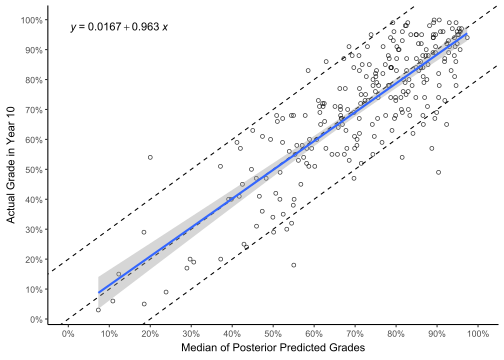
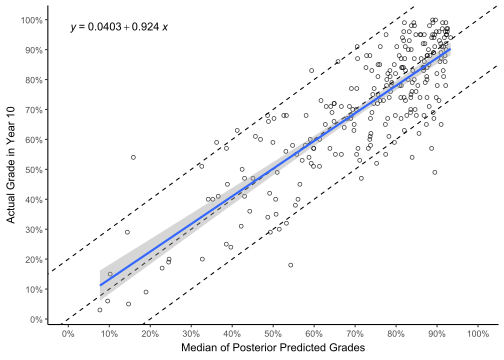
grades_pred_summary |>ggplot(aes(x = y10_hat_median, y = y10)) +geom_point(shape =1, alpha =0.8) +geom_abline(slope =1, intercept =c(-0.2, 0, 0.2), linetype ="dashed") +geom_smooth(method ="lm", formula ='y ~ x') +stat_poly_eq(formula = y ~ x,aes(label =after_stat(eq.label)) ) +scale_x_continuous(limits =c(0, 1), breaks =seq(0, 1, 0.1),labels = scales::percent) +scale_y_continuous(breaks =seq(0, 1, 0.1),labels = scales::percent) +labs(x ="Median of Posterior Predicted Grades",y ="Actual Grade in Year 10" )
# Compile the Stan Modellogit_mod <-cmdstan_model(stan_file ='stan_models/logit_model.stan')# Fit the modelfit_logit_mod <- logit_mod$sample(dat = data_list,seed =2025 )# Save the Stan modelfit_logit_mod$save_object(file ="stan_models/fit_logit_mod.RDS")fit_logit_mod$cmdstan_diagnose()rm("logit_mod", "fit_logit_mod")
Code
# Load the Stan modelfit_logit_mod <-readRDS("stan_models/fit_logit_mod.RDS")
Note that we can save our model with the saveRDS() function to avoid the computationally intensive process of fitting the model each time we render our quarto file.
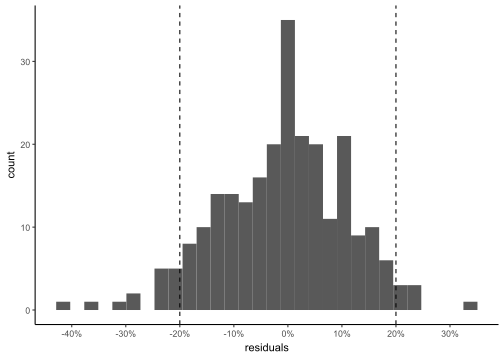
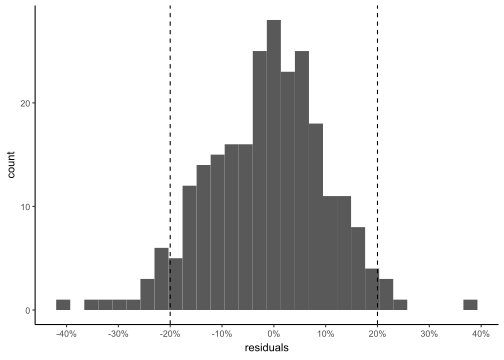
We see that the true grade is within +- 20% roughly 91% of the time.
4.3 Model Comparisons
Code
fit_lin_mod$loo()
Computed from 4000 by 250 log-likelihood matrix.

         Estimate   SE
elpd_loo    198.9 10.8
p_loo         3.8  0.6
looic      -397.7 21.5
------
MCSE of elpd_loo is 0.0.
MCSE and ESS estimates assume MCMC draws (r_eff in [0.6, 1.3]).

All Pareto k estimates are good (k < 0.7).
See help('pareto-k-diagnostic') for details.
Code
fit_logit_mod$loo()
Computed from 4000 by 250 log-likelihood matrix.

         Estimate   SE
elpd_loo    203.2 11.0
p_loo         3.8  0.5
looic      -406.3 22.0
------
MCSE of elpd_loo is 0.0.
MCSE and ESS estimates assume MCMC draws (r_eff in [0.5, 1.4]).

All Pareto k estimates are good (k < 0.7).
See help('pareto-k-diagnostic') for details.
Based on LOO cross-validation, the logit model has slightly better predictive performance than the linear model, with an elpd difference of 4.4 (SE = 3.0).